How to make a spinning vinyl video for Instagram Reels.
A record turning on a deck is still the quickest release video there is. Here is how to make one that fits a Reel, from the cover to the post.
Opens with a turntable and 9:16 ready. Free to design, sign in only to export.
- 1
Start with 9:16
Reels are vertical, 1080 by 1920. In the studio, open Export and pick 9:16. The preview becomes a vertical frame, so you see what the Reel will show. You sign in, with Google or an email, when you export, not before.
- 2
Add your song and a square cover
Drop both on the studio. A square cover of 1000 pixels or more stays sharp on the label. If your song file carries its artwork, the studio uses it, and you can drop another cover over it.
- 3
Pick the record
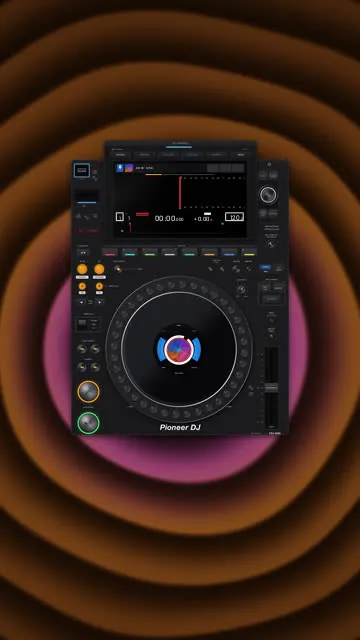
In Player, choose Vinyl for a pressing, or a turntable for the whole deck. A black vinyl exports free. A colored pressing, a Technics deck or a CDJ is Pro: try them all first, the Export lists what needs Pro.
- 4
Choose the 15 to 30 seconds that hook
In Media, pick the part of the song for your clip: the drop, or the first line of the chorus. A short clip suits a feed, and a free export is up to 45 seconds anyway.
- 5
Create the video
Tap Create video. The record turns a whole number of times, so the clip loops without a jump. On iPhone, tap Save to Photos when it is ready. On a computer the MP4 downloads itself.
- 6
Post it as a Reel
In Instagram, make a new Reel and pick the video. Your track is the sound of the file: do not add another song over it. Write the title and the date in the caption, and put your link in your bio, since a caption link is not clickable.
What fits a Reel
- The top of a Reel carries Instagram's bar and the bottom carries your caption. In 9:16, a turntable, a CDJ or any other player is centered in the part between them, so nothing sits under your text. A plain disc or vinyl sits in the middle of the frame.
- A free export carries a small watermark. Pro exports have none.
- Change the gear from one post to the next. The same track on a turntable, then on a CDJ, reads as a new clip.
Before you post
Post music you have the right to use. If the track is yours, or you have permission, you are fine. A track by someone else can get muted or taken down by the platform, whatever tool made the video.
Planning the whole release? The release guide covers what to post before, on and after release day. Making a Spotify Canvas from the same design takes a minute.
Questions
- What size is an Instagram Reel?
- Vertical 9:16, 1080 by 1920. AudioAnimate exports exactly that in its 9:16 format.
- Is it free to make a spinning vinyl Reel?
- Designing is free. A free export is a black vinyl or a disc over a color, up to 45 seconds, with a watermark. A colored pressing, a turntable or a CDJ needs Pro to export.
- Does the video keep my song as sound?
- Yes. The MP4 has your clip of the song as its audio, in AAC.
Try it with your own track.
Drop a cover and a song in the studio. Everything is open to try, and nothing to pay until you export.